Photoshop 16 bit Setup Workaround

Found this out there – it worked for me.

After having the same troubles with installing Photoshop 6.0 on Win 7 x64 Professional I finally got the installation working by doing the following:
  • Run msconfig
  • Select Diagnostic startup
  • Reboot computer
  • Locate Photoshop file setup.exe (it’s in sub directory “Adobe Photoshop 6” on the CD)
  • Right click on setup.exe and choose Run as administrator
  • Now the installation program should start, it did for me at least.
  • Go through installation as usual.
  • Run msconfig again
  • Select Normal startup
  • Reboot computer
  • Enjoy
I hope that helps someone.

Duplicating a mysql database

Here is a simple way to duplicate a database from the command line of a windows server:

1.Create the target database using MySQLAdmin or your preferred method. In this example, db2 is the target database, where the source database db1 will be copied.
2.Execute the following statement on a command line:

mysqldump -h [server] -u [user] -p[password] db1 | mysql -h [server] -u [user] -p[password] db2

Note: There is NO space between -p and [password]

If you do not want to add the password on the command line, you can leave that blank and you will be prompted for it.

Black Bars on the Side of the content on my monitor

Sometimes when I plug in an HDMI to my laptop to use my regular desktop monitor, I get two black bars squeezing the content down.  The way to fix it is to Roll back the driver.  At least it works for me.  This is a ‘note to self’ to remind me when it happens again, but maybe it will help you to.


To find duplicates in a mysql field

Do a SELECT with a GROUP BY clause. Let’s say name is the column you want to find duplicates in:

SELECT name, COUNT(*) c FROM table GROUP BY name HAVING c > 1;

This will return a result with the name value in the first column, and a count of how many times that value appears in the second.

To Clone a DB

mysqldump yourFirstDatabase u user ppassword > yourDatabase.sql $ mysql yourSecondDatabase u user ppassword < yourDatabase.sql


Perl MySQL Transaction example

transactions


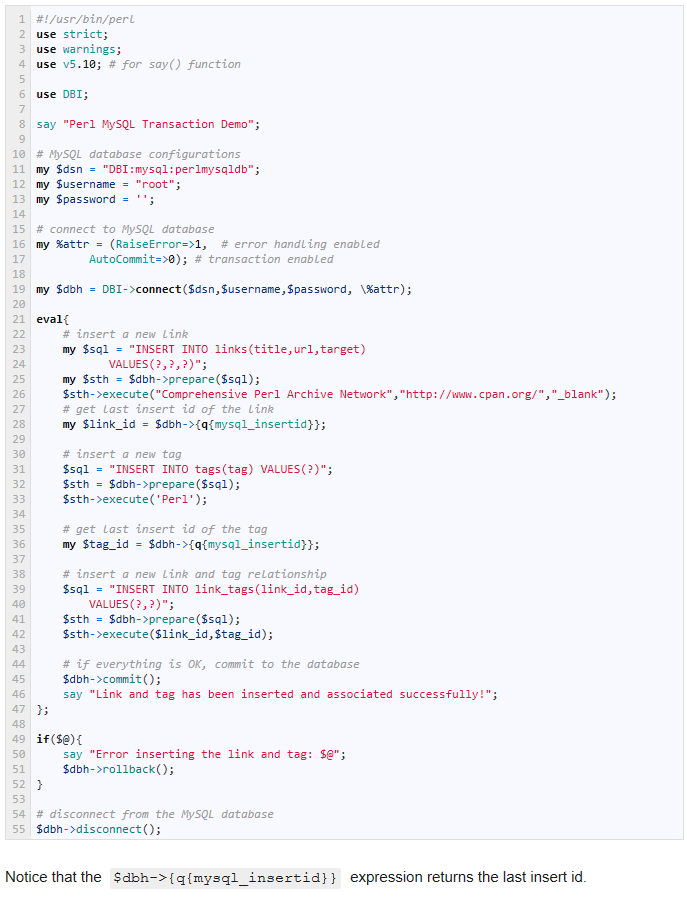
use strict;
use warnings;
use v5.10; # for say() function

use DBI;

say “Perl MySQL Transaction Demo”;

# MySQL database configurations
my $dsn = “DBI:mysql:perlmysqldb”;
my $username = “root”;
my $password = ”;

# connect to MySQL database
my %attr = (RaiseError=&gt;1,  # error handling enabled
AutoCommit=&gt;0); # transaction enabled

my $dbh = DBI-&gt;connect($dsn,$username,$password, \%attr);

eval{
# insert a new link
my $sql = “INSERT INTO links(title,url,target)
VALUES(?,?,?)”;
my $sth = $dbh-&gt;prepare($sql);
$sth-&gt;execute(“Comprehensive Perl Archive Network”,”http://www.cpan.org/”,”_blank”);
# get last insert id of the link
my $link_id = $dbh-&gt;{q{mysql_insertid}};

# insert a new tag
$sql = “INSERT INTO tags(tag) VALUES(?)”;
$sth = $dbh-&gt;prepare($sql);
$sth-&gt;execute(‘Perl’);

# get last insert id of the tag
my $tag_id = $dbh-&gt;{q{mysql_insertid}};

# insert a new link and tag relationship
$sql = “INSERT INTO link_tags(link_id,tag_id)
VALUES(?,?)”;
$sth = $dbh-&gt;prepare($sql);
$sth-&gt;execute($link_id,$tag_id);

# if everything is OK, commit to the database
$dbh-&gt;commit();
say “Link and tag has been inserted and associated successfully!”;
};

if($@){
say “Error inserting the link and tag: $@”;
$dbh-&gt;rollback();
}

# disconnect from the MySQL database
$dbh-&gt;disconnect();

MySQL Date and Time Fields

How to create a TIMESTAMP/DATETIME column in MySQL to automatically be set with the current time

The TIMESTAMP data type is the only way to have MySQL automatically set the time when a row was inserted and/or updated. DATETIME columns can’t do this.

TIMESTAMP columns are identical to DATETIME columns with one important exception — they can be set to take the current time value when a row is created or updated.

You can define more than one TIMESTAMP colum in a table — however, only ONE TIMESTAMP column in a table can be configured for Auto-Update or Auto-Initialization.

(For that reason, I usually make a practice of setting other columns to ‘DATETIME’ so there’s only one ‘TIMESTAMP’ column per table.)

There are four options when using TIMESTAMP, they are:

  • Auto-initialization and auto-update:
  ts TIMESTAMP DEFAULT CURRENT_TIMESTAMP ON UPDATE CURRENT_TIMESTAMP
  • Auto-initialization only:
  ts TIMESTAMP DEFAULT CURRENT_TIMESTAMP
  • Auto-update only:
  ts TIMESTAMP DEFAULT 0 ON UPDATE CURRENT_TIMESTAMP
  • Neither:
  ts TIMESTAMP DEFAULT 0


Here’s an example of a complete ‘CREATE TABLE’ statement that shows how it all works:

CREATE TABLE `foo`.`timestamp_example` (
`id`                  INTEGER(10) UNSIGNED AUTO_INCREMENT,
`some_text_field`     VARCHAR(20),
`updated_at`          TIMESTAMP ON UPDATE CURRENT_TIMESTAMP,
`created_at`          DATETIME DEFAULT NULL,
PRIMARY KEY (id)
);

Note that only one of the fields can be TIMESTAMP, that’s a limitation of MySQL.

The choice to use the TIMESTAMP on the ‘updated_at’ field was random in this example. Choose whatever makes sense for your application.

Click here to go to the table of contents for all MySQL Programming Example Code